MiniMax H3 References to Video
Generate 2K videos from multimodal references with MiniMax H3. Guide subject, style, motion, and audio using up to 9 images, 3 video clips, and 3 audio clips cited by order in your prompt.
No workflow setup required · Fully customizable in AI-Flow
What This App Does
MiniMax H3 References to Video turns mixed references into polished short-form video. Provide a prompt and combine up to 9 reference images for subject and style, up to 3 reference video clips for motion cues, and up to 3 reference audio clips for timing and mood—each cited in your prompt by order. The model prioritizes subject consistency while interpreting your style and movement directions.
Configure aspect ratio (adaptive, landscape, square, portrait), choose duration from 5–15 seconds, and output at 2K or 768P. The endpoint accepts HTTP/HTTPS URLs for images, videos, and audio, enabling flexible creative control for ads, social content, product showcases, character loops, and motion studies.
Pricing guidance: output costs scale by resolution (11.6 credits/s at 768P, 18.8 credits/s at 2K). First 5 reference images are free; additional images cost credits each. Reference videos are billed per second; reference audio is free. This template is optimized for fast iteration with reliable adherence to references over pure text generation.
How to Use the App
Here’s what you get when you open the app: a short form, one run button, your results — no nodes, no setup.
MiniMax H3 References to Video
App previewFill in the form
Prompt
Type your prompt…
Reference Image Urls
OptionalAdd images or files
Reference Video Urls
OptionalAdd images or files
Reference Audio Urls
OptionalAdd images or files
Aspect Ratio
Optionaladaptive
+2 more options in the app
≈ 58–1150 credits / run
Get your result
Real output generated with this app
Under the Hood
Want more control?
This app is powered by a fully editable AI-Flow workflow. Change the model, prompts, layout, resolution — or connect it to other steps.
Prompt
[Reference Generation] Image 1 is a four-panel storyboard reference. Use it only as a guide for shot order, framing, character appearance, product appearance, environment, lighting, and editing rhythm. IMPORTANT: the storyboard grid, borders, captions, pane...
Reference Images
H3 Reference to Video
How to Use This Template
Step 1: Enter your text in 'Prompt' Node
Fill the 'Prompt' node with the required text.
[Reference Generation]

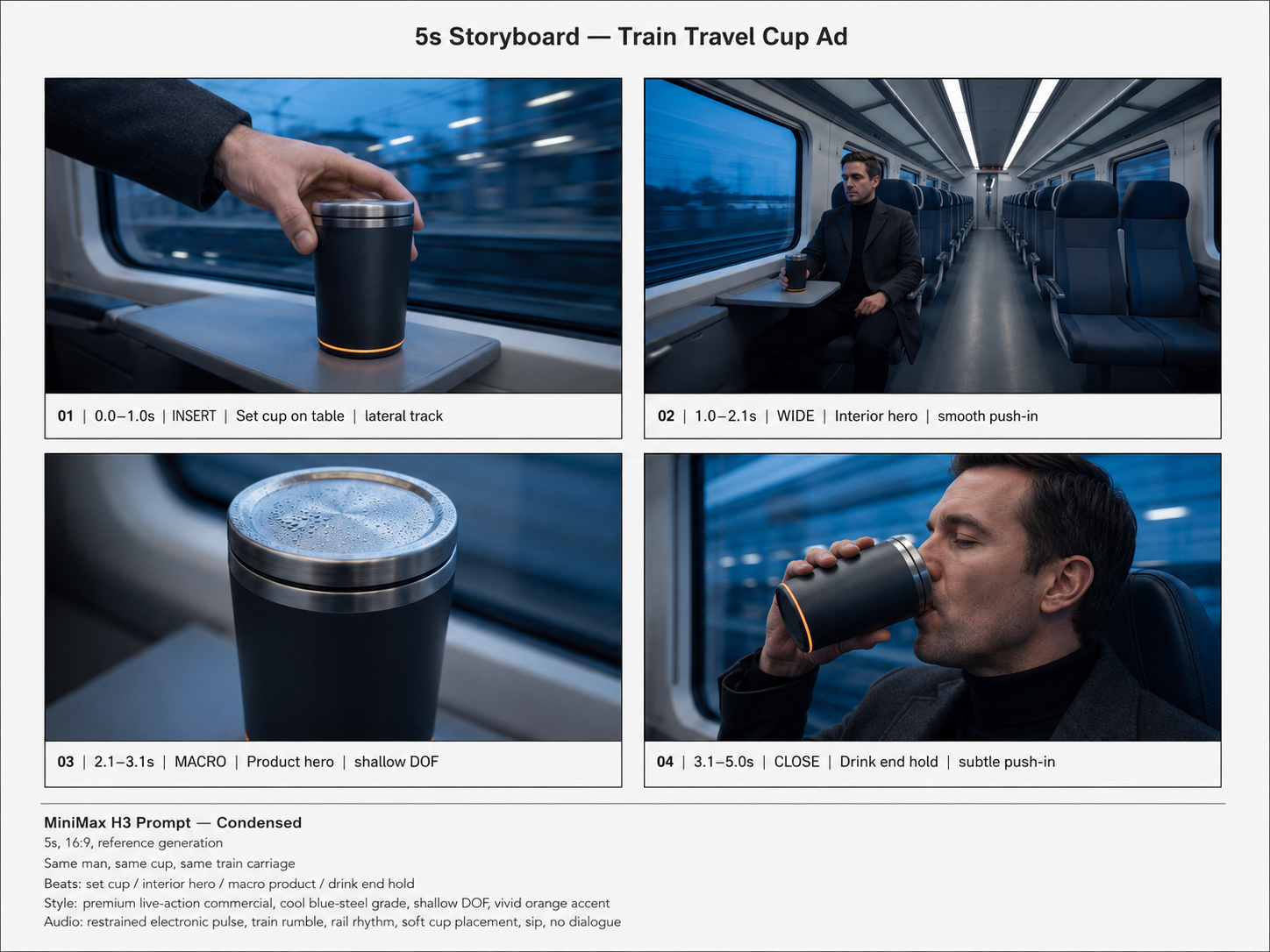
Image 1 is a four-panel storyboard reference. Use it only as a guide for shot order, framing, character appearance, product appearance, environment, lighting, and editing rhythm.

IMPORTANT: the storyboard grid, borders, captions, panel numbers, and white page must NEVER appear in the generated video. Image 1 is NOT a first frame and must never be reproduced as a flat storyboard image. Each panel represents one successive live-action shot.

Continuity throughout the entire video:
Same clean-shaven dark-haired man, wearing a charcoal overcoat over a black turtleneck.
Same matte-black cylindrical travel cup with brushed-steel lid and rim, visible condensation, and a thin glowing orange ring near the base.
Same modern train carriage with navy seats, white interior panels, wide windows, and cool blue dusk outside.
Keep the man's face, clothes, cup proportions, materials, and orange ring consistent between every cut.

5-second premium travel-cup commercial, 16:9.

SHOT 1 — 0.0-1.0s
INSERT. Close-up of his bare right hand setting the cup onto the small table beside the train window.
Fast controlled lateral camera track.
The train exterior streaks past the window in blue dusk motion blur.
The orange base ring becomes clearly visible as the cup touches the table.
Clean, decisive product-introduction beat.

HARD CUT.

SHOT 2 — 1.0-2.1s
WIDE INTERIOR HERO.
The man sits alone beside the window in the nearly empty carriage, the cup beside him.
Slow smooth push-in toward him.
Strong depth through the aisle, calm composed posture, premium cinematic symmetry.
Blue dusk landscape streaking softly outside.

HARD CUT.

SHOT 3 — 2.1-3.1s
MACRO PRODUCT HERO.
Extreme close detail of the cup on the table.
Camera glides gently across the brushed-steel lid and rim.
Condensation beads catch the passing ceiling lights.
Very shallow depth of field.
Matte-black surface stays clean and realistic; the thin orange ring subtly glows against the cool blue environment.

HARD CUT.

SHOT 4 — 3.1-5.0s
PROFILE CLOSE-UP.
The same man raises the same cup and takes one calm drink beside the window.
Subtle slow push-in as he drinks.
Cup remains prominent in the foreground while his face stays recognizable and consistent.
Train lights and blue scenery streak softly behind him.
End on a stable premium hero frame with the cup still at his lips.

Visual style:
High-end photoreal live-action commercial.
Cool blue-steel cinematic grade with vivid restrained orange accent.
Fine film grain, realistic skin, realistic hands, accurate product geometry.
Wide-aperture lens feel, shallow depth of field, polished controlled highlights.
Precise stabilized camera motion.
Fast, confident advertising edit with four clearly separated shots.
No morphing between shots, no duplicate cups, no wardrobe changes, no change of carriage, no logos, no text, no subtitles, no storyboard elements.

Audio:
Restrained minimal electronic pulse underneath.
Continuous low train rumble and rhythmic rail sound.
Soft tactile cup placement in shot 1.
Subtle metallic/material detail during the macro shot.
Natural quiet sip in the final shot.
No dialogue, no voice-over.
Step 2: Upload your files
In the 'Reference Images' node, upload the files you want to use in the workflow.
Step 3: Run the Flow
Click the 'Run' button to execute the flow and get the final output.
Customize the underlying workflow
Open the full workflow in the AI-Flow editor to swap models, rewrite prompts, or connect it to other steps.
Who is this for?
Perfect for professionals and creators looking to streamline their workflow
Creative directors and motion designers
Translate boards and look-dev references into consistent motion pieces by combining image style guides with video motion cues.
Marketing and social teams
Produce on-brand short videos quickly from existing campaign assets, UGC clips, and sound beds sized for any channel ratio.
Product teams and eCommerce
Create product spins, feature highlights, and stylized loops using product photos plus motion references for smooth camera paths.
Content creators and agencies
Remix assets into fresh edits, maintain character or mascot consistency, and align pacing with reference audio for hooks.
Ready to create?
Start using this app
No workflow setup required — open the app and start creating in minutes
You Might Also Like
Explore other powerful templates to enhance your AI workflow
Gemini Omni 1.1 Flash
Create cinematic AI videos from text, images, or existing footage with Gemini Omni 1.1 Flash—multimodal text-to-video, image-to-video, and video-to-video with native sound design and coherent, real‑world motion.
MiniMax H3 - First to Last Frame
Animate a first frame into a coherent 2K video (5–15s) with optional last frame matching, prompt-directed motion, and native stereo audio using MiniMax H3.
Gemini Omni Flash
Create cinematic AI videos from text, images, or existing footage with Gemini Omni Flash—multimodal text-to-video, image-to-video, and video-to-video with native sound design and coherent, real‑world motion.
Storyboard to Cinematic Video with Seedance
Turn a 4-panel storyboard into a polished, multi-shot cinematic video. Generate the storyboard from a single prompt, then let its shot sizes, framing and camera rhythm drive one continuous 5-second spot with synchronized audio.
Create Product Videos from Images with Seedance 2.0
Create cinematic product videos from images with Seedance 2.0—turn static product shots, environments, and logos into polished, motion-designed ads in seconds.
Animate Image with Seedance 2.0
Animate any still image into a cinematic video with Seedance 2.0—smooth motion, dynamic camera moves, and optional AI audio while preserving your original style and composition.
Frequently Asked Questions
What inputs does MiniMax H3 References to Video support?
A text prompt plus up to 9 image URLs (subject/style), up to 3 video URLs (motion), and up to 3 audio URLs (timing/mood). All URLs must start with http:// or https://.
How do I cite references by order in the prompt?
Refer to them explicitly by index or sequence (e.g., “Image 1: main subject,” “Video 2: camera dolly,” “Audio 1: beat for cuts”). The model maps your instructions to the order of the provided lists.
What are the duration and resolution options?
Choose 5–15 seconds for duration. Output resolutions include 768P and 2K. Aspect ratios include adaptive, 21:9, 16:9, 4:3, 1:1, 3:4, and 9:16.
How is pricing calculated?
Output costs are per second (approx. 11.6 credits/s at 768P and 18.8 credits/s at 2K). The first 5 reference images are free; additional images cost credits each. Reference video incurs credits per second; reference audio is free.
Will the model keep my subject consistent?
Yes. Subject consistency is prioritized using your image references. Provide multiple clear angles or close-ups among the up to 9 images for best fidelity.
What happens if I provide no reference videos or audio?
The model infers motion from your prompt alone and produces a silent clip unless you add audio references. Motion references improve camera moves and pacing.
Any limits on reference counts or file types?
Up to 9 images, 3 videos, and 3 audio clips are supported via URLs. Use common web-friendly formats (e.g., JPG/PNG for images, MP4 for video, MP3/WAV for audio).
How should I write an effective prompt?
Be explicit about subject, style, camera moves, scene beats, and how each reference should be used (e.g., “Match color grade to Image 3; follow camera orbit from Video 1; cut to beat of Audio 2”).
What is the output?
A generated video accessible via URL. You can download or stream it in your chosen resolution and aspect ratio.
Does adaptive aspect ratio change framing automatically?
Yes. Adaptive allows the model to best fit composition to the content. For strict platform requirements, select a fixed ratio like 9:16 or 16:9.
What is AI-FLOW and how can it help me?
AI-FLOW is an all-in-one AI platform that allows you to build, integrate, and automate AI-powered workflows using an intuitive drag-and-drop interface. Whether you're a beginner or an expert, you can leverage multiple AI models to create innovative solutions without any coding required.
Is there a free trial available?
Yes, AI-FLOW offers a free trial to get you started. After that, you can purchase credits as needed—no subscription or long-term commitment required.
Can I integrate my API keys from providers like OpenAI and Replicate with AI-FLOW Cloud Version ?
Yes, you can easily integrate your existing API keys with AI-FLOW. If specified, nodes related to the API key provided will use your API key, significantly reducing your platform credit usage.