
Character Describer
Extract consistent, generator-ready character descriptions from a single image, with either a fluent paragraph or strict JSON schema output.
No workflow setup required · Fully customizable in AI-Flow
What This App Does
Character Describer turns a portrait into a reusable visual identity, focusing only on traits that travel with the person. It ignores background, props, and lighting, and captures concrete, reproducible details such as age range, gender presentation, build, hair length/color/style, skin tone, distinguishing features, outfit, and expression.
Two modes are available: textual_description outputs a concise, natural paragraph optimized for image-generation prompts; structured_json_description returns a strict JSON object with fields: age_range, gender_presentation, build, hair {length, color, style}, skin_tone, distinguishing_features[], outfit, and expression. This makes it easy to feed consistent attributes into creative pipelines, prompt builders, metadata, or asset databases.
Designed for reliability and speed, the template uses a multimodal LLM to analyze a provided image URL and produce clean, repeatable descriptions for concept art, NPCs, casting lookbooks, continuity, and influencer/brand avatars. It does not perform face recognition or infer identity, and it avoids speculation, returning only what’s visibly evident. Ideal for prompt engineers, game and film teams, marketers, and dataset labelers who need accurate, structured character attributes at scale.
How to Use the App
Here’s what you get when you open the app: a short form, one run button, your results — no nodes, no setup.
Character Describer
App previewFill in the form
Image
RequiredAdd images or files
Mode
RequiredTextual Description
Get your result
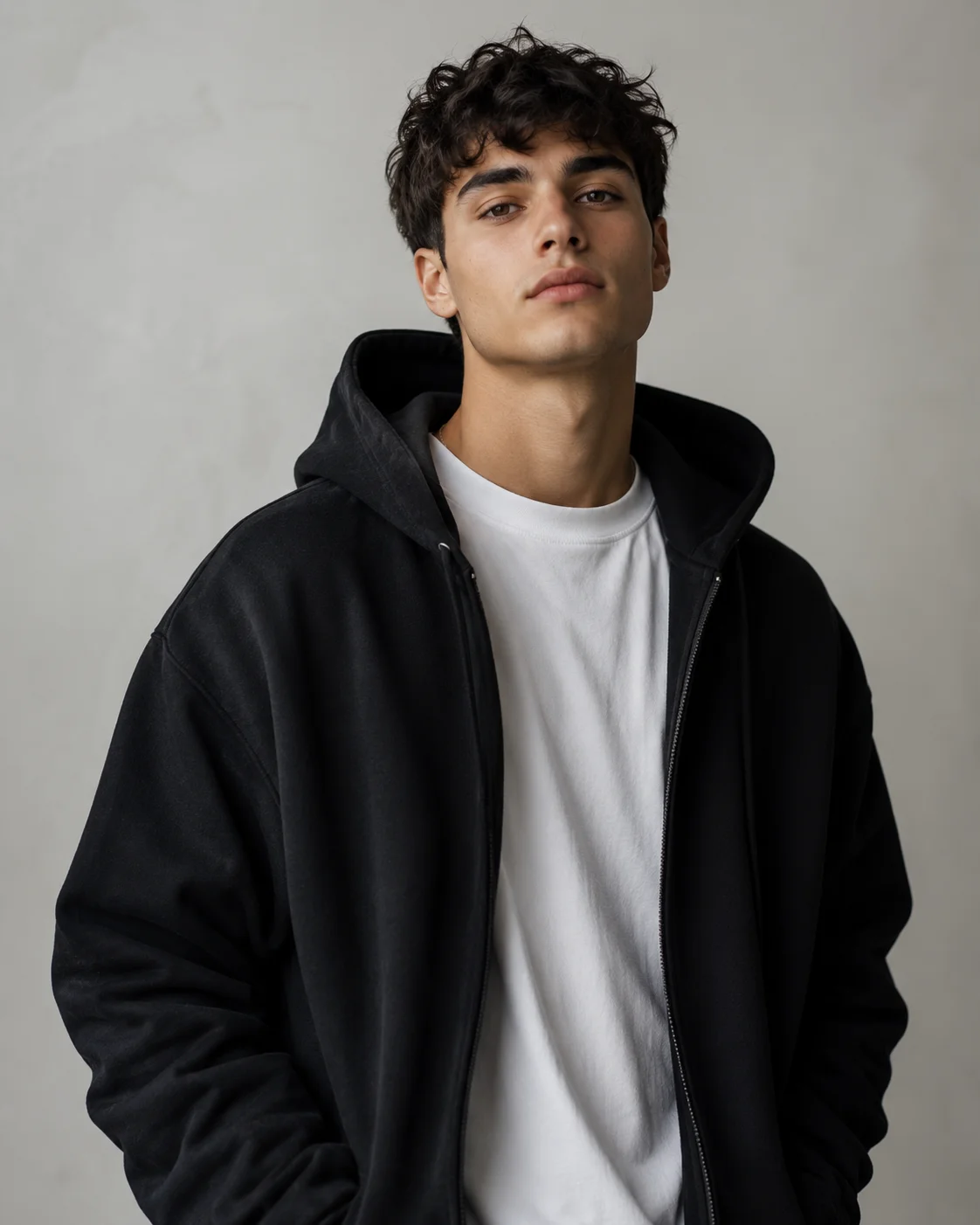
Real output generated with this app
Under the Hood
Want more control?
This app is powered by a fully editable AI-Flow workflow. Change the model, prompts, layout, resolution — or connect it to other steps.
Mode
textual_description
Image
Evaluate Condition
Conditional branch
Evaluate Condition
Conditional branch
Conditional Gate
Conditional Gate
GPT Structured Output
GPT
Around 20, male-presenting, slim build, light olive skin, thick dark eyebrows, clean-shaven face, and short-to-medium dark brown curly hair worn tousled with volume over the forehead. He has defined cheekbones, a straight nose, and full lips, with no visibl...
Descritpion
How to Use This Template
Step 1: Upload your file
In the 'Image' node, upload the file you want to process.
Step 2: Configure 'Mode' Node
Configure the 'Mode' node as needed.
textual_description
Step 3: Run the Flow
Click the 'Run' button to execute the flow and get the final output.
Customize the underlying workflow
Open the full workflow in the AI-Flow editor to swap models, rewrite prompts, or connect it to other steps.
Who is this for?
Perfect for professionals and creators looking to streamline their workflow
Generative artists and prompt engineers
Create consistent, reusable prompts by converting portraits into precise, generator-ready text or JSON attributes.
Game developers and character designers
Rapidly document NPCs and hero characters with standardized appearance fields that slot into design bibles and asset trackers.
Film/TV continuity and casting teams
Maintain visual continuity notes across scenes and versions without referencing background or lighting conditions.
Writers and world-builders
Turn reference photos into clean, repeatable character sheets for manuscripts, bibles, and pitch decks.
Marketing and brand teams
Keep virtual influencers or brand avatars visually consistent across campaigns with structured, shareable descriptors.
Dataset labelers and MLOps
Produce standardized, schema-validated annotations for appearance attributes to enrich creative or research datasets.
Ready to create?
Start using this app
No workflow setup required — open the app and start creating in minutes
You Might Also Like
Explore other powerful templates to enhance your AI workflow

Amazon Listing Builder
AI-powered Amazon Listing Builder that turns a product photo and seller brief into SEO-ready titles, bullets, descriptions, keyword packs, and image callouts—claim-safe and marketplace-aware.
Amazon Listing Image Set Generator
Generate Amazon-ready main, lifestyle, feature, and comparison images from a single product photo—fast, compliant, and on-brand.

Nano Banana 2.1
Generate and edit high-quality images with Google Nano Banana 2.1, the latest high-efficiency Gemini image model with stronger prompt adherence, typography, visual quality, and multi-turn consistency.
Gemini Omni 1.1 Flash
Create cinematic AI videos from text, images, or existing footage with Gemini Omni 1.1 Flash—multimodal text-to-video, image-to-video, and video-to-video with native sound design and coherent, real‑world motion.

GPT Image 2.5 Flare
Generate high-fidelity images with GPT Image 2.5 Flare, optimized for real typography, multilingual scripts, structured layouts, and print-ready formats up to 4K—ideal for editorial posters, comics, marketing assets, UI comps, and social graphics.

GPT Image 2.5 Sunburst
Generate high-fidelity images with GPT Image 2.5 Sunburst, optimized for real typography, multilingual scripts, structured layouts, and print-ready formats up to 4K—ideal for editorial posters, comics, marketing assets, UI comps, and social graphics.
Frequently Asked Questions
What makes this different from generic image captioning?
It describes only the person’s persistent attributes—age range, build, hair, skin tone, distinguishing features, outfit, and expression—while ignoring background, props, and lighting. The result is more consistent and prompt-ready.
Which output modes are supported?
Two modes: textual_description returns one fluent paragraph optimized for AI image generators; structured_json_description returns a strict JSON object with fields for age_range, gender_presentation, build, hair {length, color, style}, skin_tone, distinguishing_features[], outfit, and expression.
What images work best?
Clear, frontal or three-quarter portraits with minimal occlusion. Higher resolution helps with hair texture, skin details, and outfit materials. Avoid heavy motion blur, extreme shadows, or aggressive filters.
Can it identify who the person is?
No. The tool does not perform face recognition, identity matching, or inference of sensitive attributes. It returns only what’s visibly evident and suitable for character appearance documentation.
Does it handle multiple people in one image?
It focuses on a single primary subject. For group photos, crop to the character of interest or run separate passes for each subject.
How accurate is skin tone and hair color under different lighting?
Results are best-effort from the visible image. Because lighting can shift perception, the tool avoids describing the lighting itself and sticks to concrete, visually supported attributes. When in doubt, validate with additional references.
How do I use the JSON output in my pipeline?
Map the schema fields directly into your prompt templates or asset metadata. For example, concatenate hair.length, hair.color, and hair.style into a single phrase, and include outfit and distinguishing_features to maintain character continuity.
Can I customize the JSON schema?
This template ships with a fixed schema for reliability. You can duplicate the flow and edit the LLM Structured Output node to add or modify fields as needed.
Does it describe background, props, or lighting?
No. By design it ignores setting and props to prevent noise and ensure the description travels across scenes and styles.
What’s the recommended workflow?
Provide an image URL, choose textual or structured mode, and consume the output. Use the paragraph directly in prompts or feed the JSON into your CMS, design bible, or automation for consistent character generation.
What is AI-FLOW and how can it help me?
AI-FLOW is an all-in-one AI platform that allows you to build, integrate, and automate AI-powered workflows using an intuitive drag-and-drop interface. Whether you're a beginner or an expert, you can leverage multiple AI models to create innovative solutions without any coding required.
Is there a free trial available?
Yes, AI-FLOW offers a free trial to get you started. After that, you can purchase credits as needed—no subscription or long-term commitment required.
Can I integrate my API keys from providers like OpenAI and Replicate with AI-FLOW Cloud Version ?
Yes, you can easily integrate your existing API keys with AI-FLOW. If specified, nodes related to the API key provided will use your API key, significantly reducing your platform credit usage.